
v0.1.0-alpha 预览版 · 还没在真机上测试v0.1.0-alpha preview · not yet tested on hardware
夜里息屏,
AI 接着跑。Screens off.
Agents on.
睡前给 Claude Code、Codex 或本地模型排好一晚上的任务。息屏跑把屏幕和键盘背光真正关掉,同时不让电脑睡眠;猫踩到键盘也不会亮,只按你定的方式醒来。 Queue a night of work for Claude Code, Codex or a local model. BlankRun really turns the displays and keyboard backlight off while keeping the computer awake. A cat on the keyboard won't light it up. It wakes only the way you choose.

一晚上是这样的A night with BlankRun
- 23:30屏幕和背光熄灭Displays and backlight go dark按「立即息屏」,或者交给定时计划。也可以延迟 1、5、15 分钟。Click “Blank now” or let the schedule do it. Delay by 1, 5 or 15 minutes if you like.
- 00:00 – 07:00电脑醒着,任务照跑The computer stays awake, jobs keep running防睡眠一直生效。屏幕被碰亮了,几秒内会自动再关。Sleep stays blocked the whole time. If something lights the screen, it goes dark again within seconds.
- 07:30按你定的方式醒来Wakes the way you chose按住 ⌃⌥W 一秒、任意键、移动鼠标,或者等计划结束。醒来后可以锁屏。Hold ⌃⌥W for a second, press any key, move the mouse, or wait for the schedule to end. Optionally lock on wake.
功能Features
下面的功能代码都写好了,还在等真机验证。All of this is written and waiting for real-hardware testing.
- 真关屏,不睡眠Real display off, no sleep
- macOS 用 IOPMAssertion 阻止睡眠,Windows 用 SetThreadExecutionState;关的是显示器电源,不是盖一层黑图。IOPMAssertion on macOS and SetThreadExecutionState on Windows block sleep. The display is actually powered down, not covered with a black image.
- 防误触唤醒No accidental wake
- 息屏期间拦截键鼠输入。唤醒方式可选:任意键、按住快捷键、移动鼠标、点击、输入密码、只在定时结束时。另有一个随时可用的紧急恢复键。Input is swallowed while blank. Wake by any key, holding a hotkey, mouse move, click, password, or only when the schedule ends. An emergency restore hotkey always works.
- 定时计划Schedule
- 比如每天 23:30 → 07:30,支持跨午夜,可以只跳过今晚。For example 23:30 → 07:30 daily. Works across midnight, and you can skip just tonight.
- 键盘背光Keyboard backlight
- macOS 上和屏幕一起关掉。用的是系统私有接口,启动时先探测,不可用就跳过,不影响其他功能。Turned off together with the screen on macOS. It uses a private API that is probed at runtime and skipped when unavailable.
- Windows 待机兜底Modern Standby fallback
- 有些新款 Windows 笔记本一关屏就进低功耗待机,后台任务会被挂起。检测到这类机器时,改用全黑遮罩。Some Windows laptops drop into Modern Standby when the display turns off, which suspends background jobs. BlankRun detects this and uses a black overlay instead.
- 小,而且只在本地Small and local
- 基于 Tauri 2,用系统自带 WebView,前端零依赖。安装包只有 1–3 MB。不联网、不上传,开源(MIT)。Built on Tauri 2 with the system WebView and a zero-dependency UI. Installers are 1–3 MB. No network, no telemetry, MIT licensed.
之后的版本:外接显示器断电(DDC/CI)、RGB 灯、开机启动、全局快捷键、开始前提醒、全屏视频时跳过。Later: external monitor power via DDC/CI, RGB lighting, launch at login, global hotkey, pre-start reminder, skip during fullscreen video.
界面Screens


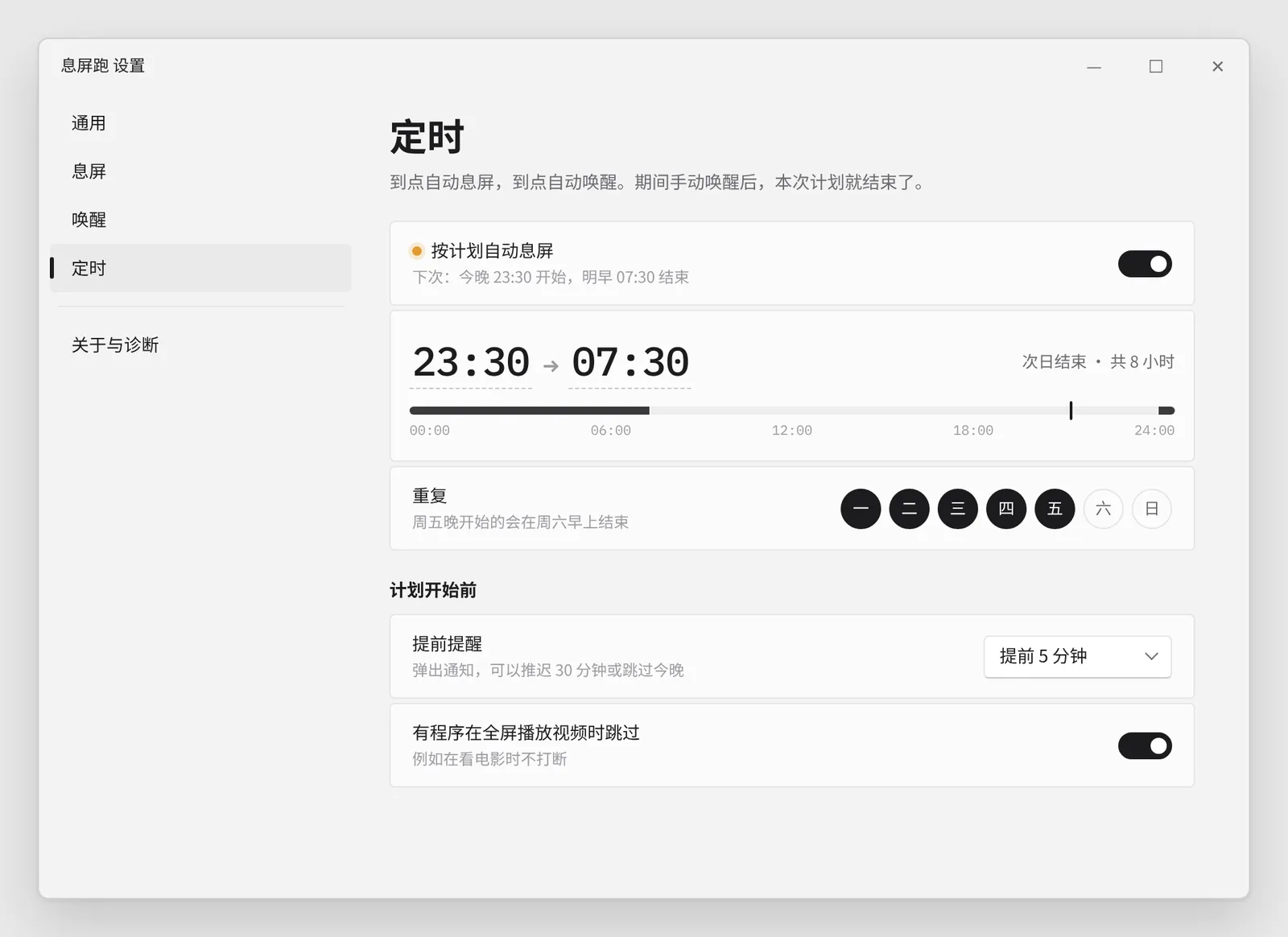
截图是设计稿渲染出来的,正式版以实际界面为准。Screens are rendered from design mockups; the shipped app may differ.
下载Download
- BlankRun_0.1.0-alpha_universal.dmg2.9 MBmacOS 11+ · Apple 芯片与 IntelmacOS 11+ · Apple silicon and Intel
- BlankRun_0.1.0-alpha_x64-setup.exe1.2 MBWindows 10/11 x64
这是早期预览版,还没在真机上测试过,有 4 个设置项暂时只保存不生效。安装包没有签名:macOS 上按住 Control 点应用选「打开」,或运行 xattr -dr com.apple.quarantine /Applications/BlankRun.app;Windows 出现 SmartScreen 时点「更多信息 → 仍要运行」。详见 发布说明。This is an early preview that hasn't been tested on real hardware, and four settings are saved but not applied yet. The installers are unsigned: on macOS, Control-click the app and choose Open, or run xattr -dr com.apple.quarantine /Applications/BlankRun.app. On Windows, click More info → Run anyway in SmartScreen. See the release notes.